
Web client - HUI
For visual access to the API we host a Website (HUI - Hyper Media UI) which renders API responses as a generic UI. HUI is not as convenient as a handcrafted UI but still very useful to understand the API and to do quick lookups.
The login page of HUI will request you to provide the entry point for the desired API (1).
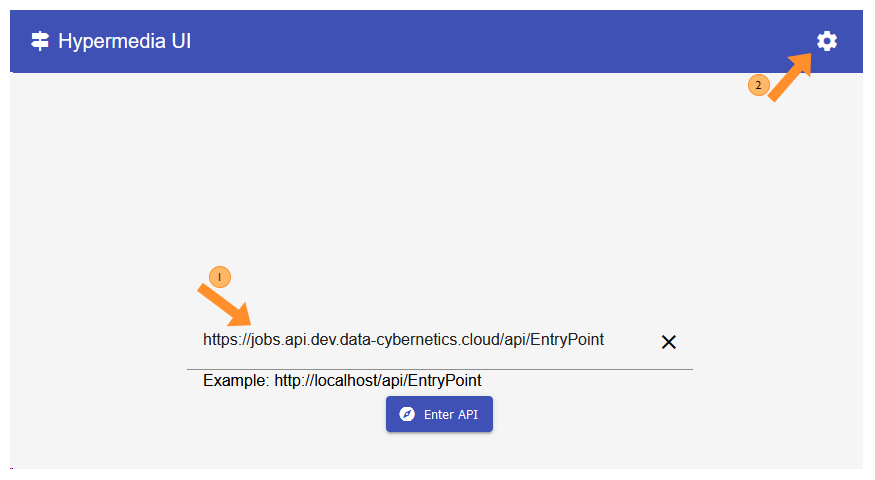
To be able to access the PineXQ you also need to provide your API key for authentication.
- Click the settings button top right (2)
- Select “Sites” (3-1)
- Click the
Add sitebutton (3-2) - Set the value
Hostto the host of the endpoint you want to call e.g.jobs.api.dev.data-cybernetics.cloud(3-3) - Add a header by clicking the
+icon next to Headers (3-4) - Add a key value pair: (3-5)
Key:x-api-keyValue: your API key
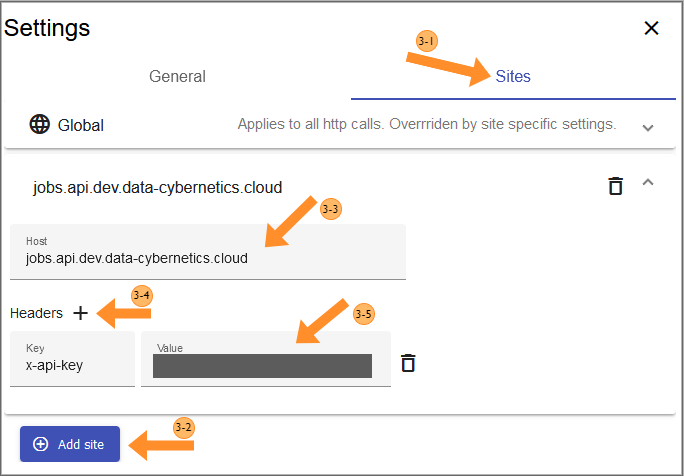
This will send your API key to all requests to the specified host which uses it to authenticate you.